Merge multiple PDFs
Bring pages from separate PDF files into one organized document.
Combine files, split documents, reorder pages, rotate, crop, resize, and extract in a visual Windows organizer that keeps core processing local.
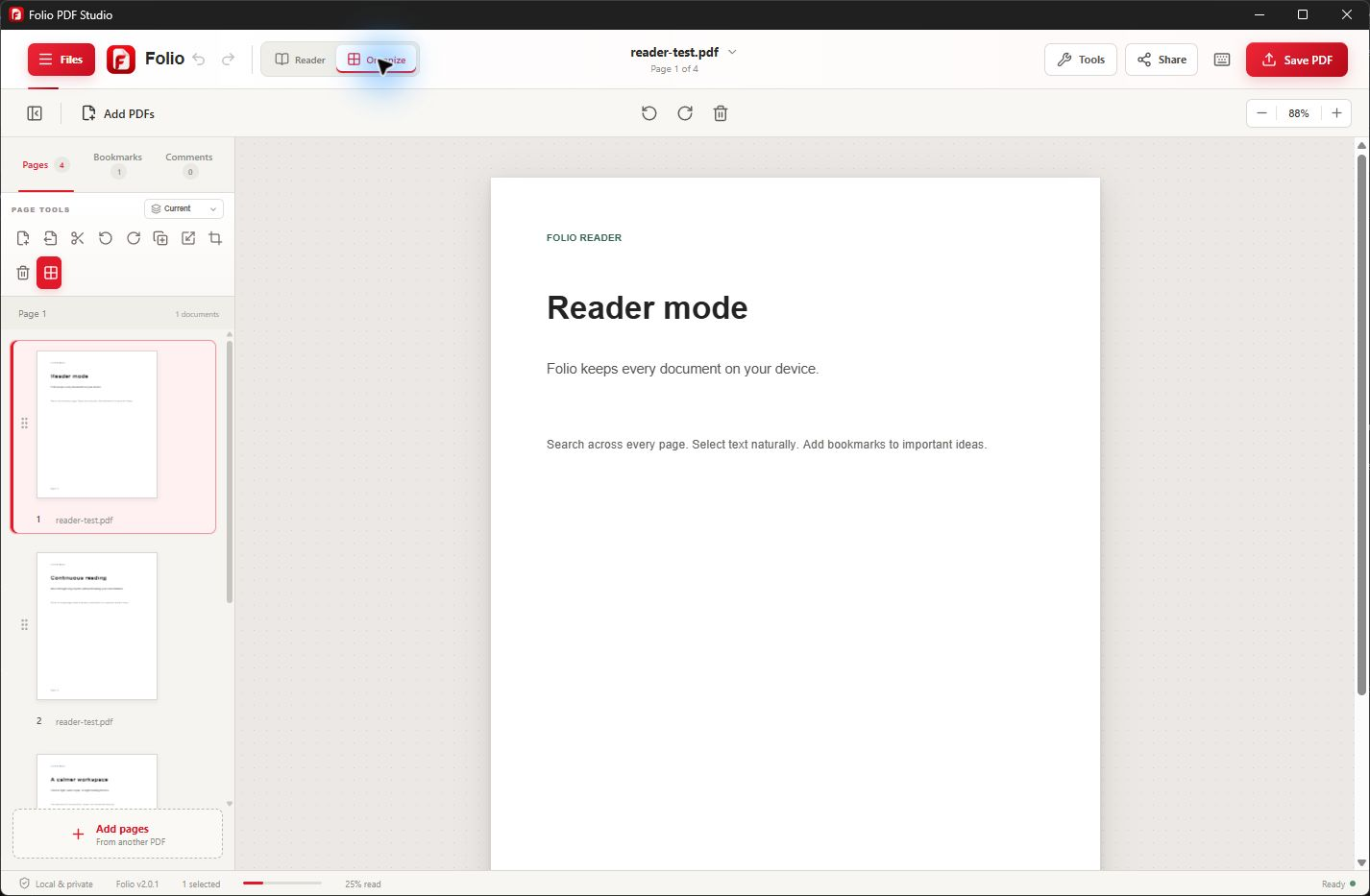
A focused Windows workflow
Page organization is easier when the structure stays visible. Folio presents PDF pages in a visual workspace so you can understand what belongs together before changing the final document.
Use the same organizer to combine source files, separate sections, move pages into a new order, fix orientation, crop unwanted space, resize pages, or extract only what another person needs.
Useful from the first document
Folio keeps related PDF tasks together so you can finish the document without moving sensitive content between unrelated services.
Bring pages from separate PDF files into one organized document.
Separate a large PDF into smaller, more focused files for distribution or archiving.
Move page thumbnails into the intended sequence while keeping the whole structure visible.
Create a new document from only the pages needed for a recipient or workflow.
Correct page orientation and dimensions before saving or printing the completed document.
Organize PDF content on the Windows device without uploading pages to Folio servers.
Simple by design
Keep the original files. To merge, add the PDFs you want to combine. To split or extract, open the source PDF and identify the pages you need. Use documents you are authorized to modify and enter the correct password if required.
Use the organizer to arrange combined pages, split the document, or extract selected pages into a separate PDF. Check page positions against the visible content: a printed page number may differ from its position in the file. Rotate sideways pages before saving.
Save the output with a descriptive new name so your source files remain unchanged. Reopen the result and check its page count, order, orientation, and readability. For a split document, check each output file before sharing it.
Common questions
Core PDF processing stays on your Windows device. Folio does not upload document content to Folio servers.
Merging combines pages; it does not recognize text inside scanned images. Run OCR when you need to search or reuse the text, then review the recognition results. Learn about offline PDF OCR for Windows.
Yes. Add multiple PDFs, review their page thumbnails, and arrange the combined document in the order you need.
Yes. Use extraction to create a separate PDF containing only the selected pages.
No. Core page organization runs locally in the Folio Windows app.
Splitting separates a document into smaller PDFs. Extraction creates a new PDF from selected pages, such as one receipt from a statement or one chapter from a report. Save separate outputs and keep the source until you have checked them.
The page position in the file may not match its printed page number, especially when a document starts with a cover or contents pages. Check thumbnails and visible headings before selecting pages, then reopen the output to verify it.
Protected files may require the correct password or an accessible copy from the owner. Combining or rearranging pages changes the document and can invalidate digital signatures. Preserve signed originals; do not treat a merged copy as the original signed record.
No. Cropping changes the visible page area and is not a substitute for redaction. Use a dedicated redaction workflow and review the sanitized output before sharing. Also check for comments, attachments, or other information you do not intend to share. Read the editing and redaction guidance.
Not necessarily. Merging combines page content, so the result can still be large, especially with scanned images. Extract only the pages the recipient needs when a smaller document is your goal; do not assume that merging is compression.
Check whether that source file opens on its own and whether it needs a password. Choose a writable output folder and a new filename. If the problem continues, contact support with your app version and the error message, without sending passwords or confidential documents. Get help with PDF organization.
One Windows app. One clear purchase.